

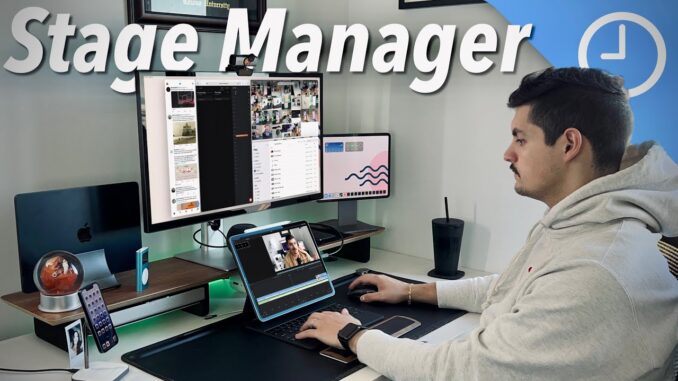
With the new iPadOS and iOS 16.2 Beta updates, Apple brought back extended monitor support for M1 & M2 enabled iPads. So I wanted to go through every single feature of both Stage Manager and Extended Monitor Support
Wallpapers I Use:
Contact me:
Email: fernando@9to5mac.com
Twitter: @nandoprince93
GEAR I USE:
iPhone 13 Pro Max:
12.9 M1 iPad Pro:
44in Ultrawide Monitor Innocn:
Screen Protector Paperlike:
Logitech MX Anywhere S2:
Subscribe:
Comment: Let me know what you think…
Follow: |
FTC: We use income-earning auto-affiliate links:
FOLLOW
–
–
–
Time stamps
0:00 – Intro
0:45 – Stage Manager Compatibility
1:18 – Extended Monitor Support Compatibility
1:33 – The Basics
1:48 – Stage Manager Settings
2:08 – Turn Stage Manager Off & On
2:20 – Stage Manager Customizations
2:28 – Opening New Windows
2:40 – Opening Multiple Windows
2:50 – How Many Windows Can You Have Open?
3:07 – Resizing Windows
3:30 – How Windows Resize
3:58 – iPhone view vs iPad View Sizes
4:16 – Resizing to Full Screen
4:36 – Smallest Window size?
4:45 – Interacting with Multiple Windows
5:08 – Adding 5th App & App Shelf
5:38 – Moving App To App Shelf
5:50 – How Many total App Open?
6:12 – Navigation Buttons
7:23 – System Shortcuts
7:33 – Multiple Instances of Same App
8:00 – How Audio Works
9:00 – Does Camera App Work?
9:37 – Moving Files Between Apps
10:10 – Do Some Apps Not Work?
10:28 – iPad Only Apps vs iPhone Apps
10:46 – Extended Monitor Support
11:03 – Monitor Im Using
12:45 – Does It Work in Clamshell mode
12:57 – Audio Out with Second Monitor
13:40 – Multi Monitor Support?
14:30 – Universal Control?
14:46 – Continuity Camera?
15:00 – Camera on Second Display?
15:50 – Summary of Features
16:45 – How I Personally Use Stage Manager?
#m2ipadpro #ipados16 #stagemanager

I’m kinda surprised how people seem to be divided about their thoughts on stage manager. “No true window resizing/moving?” Did we really expect Apple to be so flexible? Also, I actually kinda like the “gridded” approach to window sizing and location, it makes it easier to manage especially for me who uses an 11” Pro. The sizes actually make sense once you try playing around with it more with different apps.
My biggest gripe with it now though is how the window arrangements get completely crazy when flipping orientations (requiring me to fix the sizes and locations AGAIN), so now I just lock it to landscape since 90+% of the time I use it on my magic keyboard anyway. I do hope this is addressed in an update, perhaps give users the option to save window sizes and locations based on display orientation.
There are two reasons why Stage Manager acts the way it does, differing from SM on the Mac. One is that Stage Manager on the iPad is finger-oriented, not mouse-oriented since even the mouse cursor simulates a finger. Apple moves apps around so some small part of every app is exposed so the finger can touch it easily. With a mouse that has pinpoint accuracy, that isn’t necessary. The moving of apps is intended to help users by keeping every app available to be touched and brought to the foreground. Many have criticized this behavior, but without knowing why Apple does this. It’s actually intended to prevent frustration of people who can’t see or touch the apps sitting behind other apps.
The other thing is how apps only take up certain sizes and shapes. That is determined by iPadOS’s prior multitasking. If your app supports Split View and Slide Over, those are the shapes these apps can take. This is something Apple can’t really do anything about unless they allow apps to look extremely ugly like on Android. For instance, Luma Fusion can handle Split View but not slide over, so it’ll only show up at best half-screen. It is the apps that control the shape since developers wrote their programs assuming only Split View and Slide Over exist.
On your gripe over re-orientation, moving from one to the other invokes the shift algorithm to maintain proper shapes and sizes along with ensuring parts of each app are exposed since apps may no longer be visible on the other orientation in its entirety. Moving it back to the prior orientation doesn’t remember where they were but simply re-invokes the algorithm and likely puts them in different spots. I imagine each app probably isn’t the same shape, let alone the same position after a second shift. I suppose it’s fixable, requiring Apple to save state of each app before shifting including prior shape, size, and location. I can’t think of any other way to fix that because the algorithm would be determined by all the apps’ new shapes, which would likely change per orientation (e.g. too tall, too wide, no longer on screen). Macs would have similar problems, but since the orientation of a monitor rarely, if ever, changes, it’s not likely anyone would see it.
Such a nice video, thank you! I’m still exploring the stage manager feature and this is very helpful. One thing I really love about stage manager is that some iPad apps that only support portrait mode can finally be open in the landscape mode now. In the past, you have to manually rotate your iPad to use those apps. It makes it much easier when my iPad is connected to a keyboard and can’t move around.
Really hoping they change the audio output thing. I have also experienced SIGNIFICANT issues in zoom when trying to change audio output. It sent me into an endless crash loop when I tried to switch from AirPods to HomePod lol it was pretty embarrassing since I was on a client call
I wish they give us more customisable key options for other keyboards.
Really happy to see the direction they’re going. Finally heading towards real productivity/multitasking.
Regarding the camera orientation, I kinda think that the apps thinks you rotated the ipad to a landscape mode (since the window side was large, and the scale you choose was 3:4). but I believe if you change the scale to 4:3, then it would rotate back correctly. this I believe developers have to fix it when they force apps to be 4:3 (wide screen size). Note: I am using 6.1 official IOS (not beta) and facing same issue.
I’m coming around to it, but still too many bugs. It is great to see my 12.9 iPad Pro doing its thing on 24” inch HD monitor so as soon as it gains stability it will be my new way of working.
The only missing on ipados 16 is the continuity camera. Hope apple will bring these feature to future ipad os ❤
The camera app is also a little wonky with Stage Manager in 16.1, i.e. its window rotates through 90 deg if you resize too small.
Update: So I just tested this. Contrary to your findings in the video. If you grab a Mac and put it next to your iPad’s external display, you can use universal control to control the iPad and the external display with the Mac keyboard and mouse. Which is what I expected. You can also control the Mac with the iPad keyboard and mouse and you cannot use the iPad to control another iPad (as you did in the video). There has to be a Mac involved. I am typing this from my Mac’s keyboard on the iPad’s external display.
Here’s the big question I have: how do the magic keyboard (and others) swipe gestures work with the shelf? I think it’s a three finger swipe right or left to switch apps with those keyboards’ trackpad to change apps–with stage manager, does that switch between shelf slots?
Thank you for explaining Stage Manager. I’ve been nervous to use it. I see it takes time to get use to it.
Didn’t realise they had extended stage manager support to the original iPad Pro. Just checked my control centre and lo and behold. I now have stage manager! Haha. Thank you! Great video.x
This is helpful. Question, do you think it would be possible to connect this to a display that already has a Mac connected to it? Like an a/b switch type scenario?
Excellent video. I’m using iPadOS v16.2 on iPad Pro M2 and really appreciate Stage Manager. I use it with an external 4K monitor, Anker hub and a variety of USB-C devices. My only real complaints are specific to some specific applications that do not handle Stage Manager well (e.g. Proton Mail, VNC Viewer and several others). For the most part, the majority of iPad applications work well with Stage Manager. Unfortunately, the few that do have issues are the ones I use most frequently. I expect these minor issues will be resolved in upcoming releases.
I actually use stage manager on my Mq MacBook Pro and like it a lot. I use it when I need to focus on one task at a time. It’s a unique experience that I think Apple should really take time to develop.
Does using stage manager on iPad turn off if you switched over to using sidecar? Just wondering, it’s so intriguing how many options or different ways there are to use these devices this day. We can use a secondary display with the iPad, or use the iPad itself as a secondary display, it’s pretty cool. And universal control allegedly does work with a secondary display according to some commenters here who tested it out