

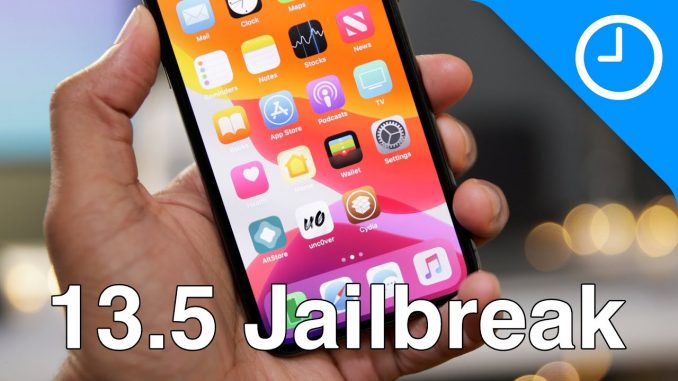
Ho to jailbreak iPhone, iPod touch, and iPad using Unc0ver jailbreak. unc0ver supports iOS 11.0 through to iOS 13.5 (Excluding 12.3-12.3.2 and 12.4.2-12.4.5)
Jailbreaking is not recommended by Apple, and could present a security risk. Proceed at your own risk.
FTC: We use income earning auto affiliate links:
Subscribe to 9to5mac podcasts!
—————————————————–
Happy Hour:
Daily:
Watch Time:
Stacktrace:
Apple @ Work:
Watch More Videos!
—————————————————–
What's new in iOS 13.5?
Review: $1799 MacBook Pro with Magic Keyboard – is it worth it?
Hands-on: all official iPhone SE 2 case color combinations
Review: 2020 MacBook Air
iPhone SE: how to force restart, recovery mode, DFU mode, etc
Which iPad Should You Buy? (2020 edition)
iPhone SE (2020) Top Features – a $399 beast!
Magic Keyboard for iPad Pro – Top Features!
iPhone SE 2 thoughts…following up a legend…
Basic ways to improve your WFH live stream setup
The Rewind: Mac mini "2020" – the most versatile Mac besides Mac Pro
iPad Pro (2020) Top Features! A glimpse into the future…
MacBook Air (2020) Top Features $999 edition!
Top iOS and iPadOS 13.4 Changes and Features
50 trackpad & mouse tips for iPad users – getting started guide
iPhone 9 preview – What to expect?
watchOS 7 and Apple Watch Series 6 leak
iOS 14 upcoming changes and features!
iOS 14 Leaks: iPhone SE 2 / iPhone 9, over-ear AirPods, more!
iOS 14 Leaks: Advanced Cursor Support! – Will Final Cut Pro X finally come to iPad?
Mac hardware is back! [Back to the Mac 017]
Tip Tuesday: Toggle Dark Mode in macOS
My 🎥🎙🖥gear:
– Sony A7 III:
– Sony FE 16-35mm f/2.8 GM:
– Sony FE 85mm f/1.4 GM:
– Sony FE 90mm f/2.8 Macro G OSS:
– Sony RX100 VA:
– Atomos Ninja V:
– Sennheiser MKH-416:
– Audio Technica ATH-M50x:
– Universal Audio Arrow:
– Fotodiox 18-inch Flapjack:
– iMac Pro:
– MacBook Air:
– iPad Pro:
Follow:
FCPX Plugins by MotionVFX:
Tested devices
iPhone 11 Pro Max 13.5
iPhone 11 Pro Max 13.3
iPhone 11 Pro 13.5
iPhone 11 13.5
iPhone 11 13.3.1
iPhone 11 13.3
iPhone 11 13.2 Beta 1
iPhone 11 13.2.2
iPhone XS Max 13.5
iPhone XS Max 13.3
iPhone XS Max 13.1 Beta 2
iPhone XS Max 12.4
iPhone XS 13.5
iPhone XS 12.4
iPhone XR 13.3
iPhone XR 12.2
iPhone X 13.5
iPhone X 13.4.1
iPhone X 12.0
iPhone SE (2020) 13.5
iPhone SE 12.1.1
iPhone SE 11.2.1
iPhone 8 Plus 13.5
iPhone 8 Plus 13.2.2
iPhone 8 Plus 12.3.2
iPhone 8 Plus 13.3.1
iPhone 8 13.5
iPhone 7 13.5
iPhone 7 13.1 Beta 1
iPhone 7 13.0 Beta 1
iPhone 7 12.0
iPhone 7 11.4
iPhone 7 11.0
iPhone 6S 12.4.1
iPod Touch 13.0 Beta 1
iPad 7th Gen 13.2
iPad Mini 5 13.4
#jailbreak #ios135jailbreak #iphone

FIRST!
This is VERY reminiscent of iPhone 3G prior to the App Store. AWESOME video!
I don’t really do jailbreak videos any more, but wanted to do this as a throwback to the old days. Do any of your guys still jailbreak? If so, why? What are your thoughts on the matter in 2020? Let me know in the comments! Also, Ayeris Promo codes, thanks to Surenix:
http://gift.dyn.dev/AB9BD40BC925270C
http://gift.dyn.dev/958F3F6B5BD5A231
http://gift.dyn.dev/3138376D27086720
http://gift.dyn.dev/358417C2872A9397
http://gift.dyn.dev/CA4245B050BA25AB
http://gift.dyn.dev/59FCF74589223520
Keep it up, support your channel
Jail beak takes too much effort now
Jailbreaking is very useful, it allows you to tether even if your carrier doesn’t, to install apps that itunes store won’t on old devices, install spy/remote access tools, better VPN, etc.
I am a very old fan. All I want to see is jailbreak stuff. Please bring us more jb videos Jeff from idb
Does it remove Icloud lock?
I missed your Jailbreak videos so much!
Still here from the evasi0n7 days. Miss ya Jeff! Missed seeing Jailbreak content!
ZiPhone days in 2007 brah.
Im still here from the good old Absinthe iOS 5 jailbreak days haha, missed this Jeff!
We missed that thank you again so much
We miss you so much on iDownloadBlog with this Jailbreak things
Jeff’s core is to show us how to jailbreak and we missed it lol
Welcome back Jeff. I missed your jb videos from IDB. this is like going back in time. #unc0ver
I remember when you solely made jailbreak videos back in 2008 or so! I have learned most of my info on iOS from you!
I haven’t jail broken in years. If I were to now it would just be for themes.
mine would be for like icon tweaks and themes
@SuperJuniorBros ther’s a lot of good stuff in this newest iOS versions
been here, still here jeff. since ios6 evasi0n
Do you trust the method of doing this jailbreak? I don’t know if I like the idea of plugging into mail and using my Apple ID.
They just need to fake certsign unc0ver app. You can always make another apple id just for that.
its safe, the Altstore its open source if you don trust..
“This is Jeff with iDownloadBlog”
The good old days
I got a notification about my Apple ID being logged into from a MacBook Pro when I did this using windows, that was very suspicious
so did I don’t even own a MacBook
I don’t see “manage plug-in”
Ad: “So LitMobile just sent me this wireless battery bank.”
I’ve been getting this ad for days straight
Good Stuff guys:
Zebra: Package Manager (Cydia Enhanced)
TweakReviewDB: Allow to see the tweaks that may not work on your iOS.
AutoUnlockX: Allows you to unlock iPhone with Face ID, without the need to make the gesture with your finger up.
Dark keys: Keyboard always dark.
A-Shields: Put Face ID or Touch ID to enter any application that you select.
BatteryPercent12: View battery on iPhone with Face ID.
Frame: Videos as wallpapers.
HomePlus Beta: Modify the position of the applications, add more columns, resize, etc.
SnowBoard: Manager of custom themes to the icons of our applications, to the dock.
iamOSXS, Sential, Muze 4, Felicity; are some recommended topics.
Shuffle: Sort and organize the Settings to be easier (highly recommended).
iKSettings: Gives a more modern look to the Settings.
Spotilife: All Spotify Premium features are activated, except for downloading music.
MImport: If you have downloaded music or you download it, you can import it directly to the Music Application.
Spotifyblack: [/ tpb] Give real colors to Spotify app colors.
NextUP 2 (iOS 12 & 13): Lets you view the next music in your playlist, and remove that music before it plays.
HomeBarMediaProgress: Allows you to see the “timeline” of music playback in the bar below.
iWhats: Allows you to see the messages even if the sender deletes them for everyone, hide when you write, hide if you are online, and unlocks the limit of files that you can send in the WhatsApp application (highly recommended).
Stalky: allows you to see all profile photo changes, changes in the status of WhatsApp contacts.
Nord: Improve the colors of the dark mode of WhatsApp.
Youtube Reborn or Cercube for Youtube: They allow you to have all the Premium functions (no ads and to be able to download music), and they also allow many other functions.
Primal Folder 2: Allows you to modify the appearance and some functions of the folders, such as opening the first application with a Haptic Touch or 3D Touch.
iCleaner Pro: Removes junk files that remain on the mobile over time, such as .cache files, .log files (MANY FREE GB).
PowerSelector (iOS11 to 13): Allows you to do a quick reset (respring), safe mode, see the occupied RAM and free RAM, all from the Control Center.
HomeTime: Allows you to put the time on the lock screen also in the (SpringBoard) where the applications are (it can be combined very well with HomePlus Beta).
AppSync Unified: Allows you to install any application or game without the application expiring (to find applications we have to use AppCake).
Filza File Manager: Allows you to see all the folders and files on the system, modify them and add new ones, it is also very useful for installing applications.
ShortLook: It is a tweak that when you receive a notification, it shows you in a super elegant way.
Clean Home Screen: It allows us to hide a lot of things from the interface, you can choose what to remove or not.
Malipo: Gives the possibility of changing the default sounds of our system, such as the sound of when we put the device to charge.
DoubleCut: When we press the @ key twice, it gives us the email we want.
FloatingDock or FloatingDockPlus13: They allow us to have the function of divided screen, to have the Dock type iPad, and other interesting functions.
HideBarX: Remove the gesture bar below.
SmallSiri: A better interface for Siri.
TapVideoConfig: Allows you to change the video recording quality from the camera application.
Thanks ! This is very helpful
if you need the repos, here you have all:
https://controlc.com/8bef7ecc
if you want to install all, first install a tweak called Flame, and then use Batch mode to add all repos at the same time