

Get 5% Off CleanMyMac X:
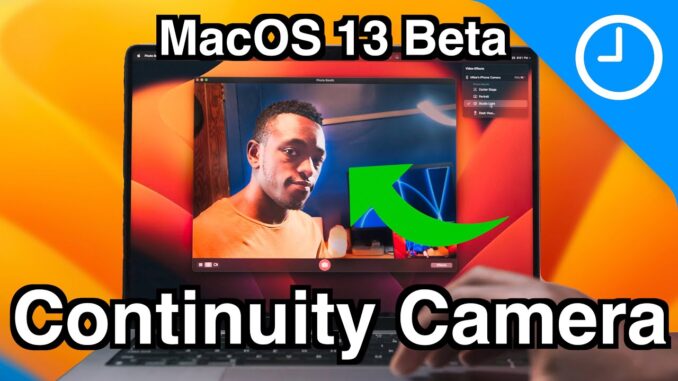
A brief hands-on and demo of Continuity Camera for the MacOS Ventura Beta!
Subscribe: 🔔
Comment: 📝 Let me know what you think…
Follow: ✅ |
FTC: We use income earning auto affiliate links:
GEAR I USE:
– Canon EOS R5:
– Sigma 24-70 F2.8:
– Canon RF to EF Adapter:
– Godox SL-60W:
– AudioTechnica AT875r:
– DJI RS2 Gimbal :
– RodeLink Wireless Lav:
– Mac mini:
– MacBook Pro:
FOLLOW
–
–
CREDITS
– Final Cut Pro Plugins by MotionVFX:
– Music by Soundstripe:
– Captions by Rev:
TAGS
#apple #ContinuityCamera #macosventura

I’m not sure if I missed in the video, but do you know what the resolution of the video is? With my Canon camera I was always only able to get 720p through the webcam utility, so I hope this will be at least 1080!
It’s 1440p I think. You can check it on their website and confirm. I saw something like that but since I can’t recollect fully, I’m not certain.
I can’t wait for this feature. I’m not sure I’ll do the beta but definitely will once Ventura is out to the public this fall. I have a Mac Mini M1 with a Dell S2721DGF and webcam is an issue I’d like to solve. My current webcam is a decent 1080p but I’m not a fan of having it clipped to the top of my monitor. I can’t wait for Ventura… com’on Apple lol …. give it up already! Geeze
That top view is mind blowing
Correction; According to docs from Apple, Wifi and Bluetooth are supposed to be on for Continuity Camera to work. Even though it did work for me with those settings disabled.
If you only disabled Bluetooth and Wi-Fi in Control Center, they’re not actually disabled. They just stop working for some things, like connecting to Wi-Fi or wireless mice and headphones, which is typically what most users want when disabling them. Some features, such as the automatic hotspot feature still work because the functionality is not actually disabled. You need to go into the settings app to fully disable Bluetooth and Wi-Fi.
Can you include non-HDR versions of YouTube uploads? It forces my screen to beyond-max brightness. (Pixel 6 pro)
Uncomfortable in all but the brightest of situations, and a battery drain.
It forces my iP13Pro as well
Got to try this out this weekend with my iPhone 12 Pro Max and my Mac Studio. I had to restart both the studio and the phone to get the camera to not freeze in FaceTime. Also, if you go back to use your phone and click on disconnect (instead of pause) then connecting back to the phone required a phone reboot for the Mac to even see the phone. Otherwise, once connected, it worked and looked great. I just leaned my phone up against my display facing me (30″ Apple Cinema Display). Neat feature that I will use more often since I don’t have a good webcam. Will be nice once the bugs are worked out.
Yeah when I click disconnect on my iPhone I needed to restarted my iPhone ti use it again
Do you still face the same bugs after 2 months?
So far it seems to work as soon as I want it to. Haven’t tried disconnecting the phone and reconnecting the phone yet. Desk view now works as it should though.
What software does your iPhone have to be on?
Can you use a continuity camera if the MacBook lid is closed and using an external screen?
Will the webcam centre stage work on iPhone 12 Pro Max?
another great video. thanks!
With the top down desk view, will handwriting display correctly or a mirrored image? If it can be used as a modern version of old projectors we used in school, this would be a great feature for teachers and tutorials!
displays correctly
Might be that it’s just in a beta mode but I’ve installed Ventura on my M1 MacBook Pro and iOS 16 on my 13 Pro Max and when I turned the Mac and iPhone on and off they could connect once in Google Meet. But after that I never get the option to use my iPhone in Facetime or Photobooth etc even when bluetooth and wifi is on. Any tips?
I had a similar (?) issue. First time I tried, it worked right away, but then the mac somehow prompted me to plug in the iphone to “re-enable” camera continuity. I plugged it, then it started working again (plugged or NOT).
I don’t have an option for Desk View however (same devices/versions as you)
My favorite thing about Continuity Camera is the fact that Apple is finally using the iPhone’s camera for Macs. It’s about time! Every feature is awesome actually. Hopefully it’s good enough that I can use it as my main camera for content creation.
Does the audio lag?
Do you need to be near your Mac mic or can you talk into your iPhone mic?
I’d love to see some more features. Manual exposure/shutter speed/iso, zoom, mirror video and so on. But for the first release, I think it’s awesome anyway 🙂
Does the iPhone SE 2020 can be used for it too? Or do I need a wide camera?
Just updated my Mac mini to Ventura and trying to make this work – first it had me upside down then i got it working briefly – now for some reason i cannot connect my iphone. When going to the ‘video’ section of menu I can click Automatic camera selection but there is a big ‘no camera available in the FaceTime screen. I’ve tried turning my phone off and on again but nothing is happening. I note that you have way more options showing in your ‘video’ menu than i do but I can’t get more to show up (including my iPhone – it’s all very strange.
I’ve also tried restarting both devices
Is there any way to use the wide angle camera?
How do you change your windows to a certain colour? Do you need to download something to do that?
Nice review … as far as continuity wifi coverage, I will have to try the Continuity Camera feature with “Speedify VPN” … should work to allow me to expand the WiFi distance issue that you talked about in your review