

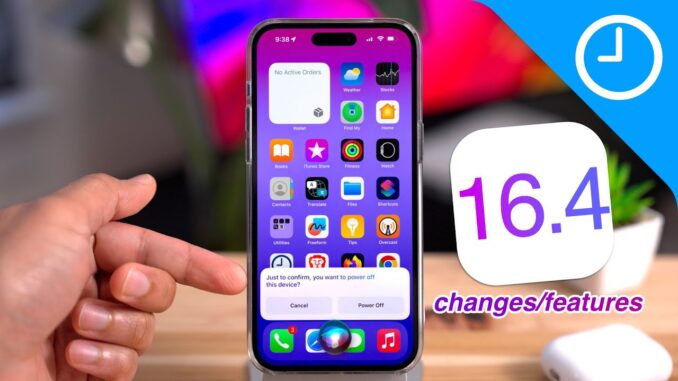
What's new in iOS 16.4? A look at over 50 new changes and features for iOS 16.4. New changes include voice isolation for cellular connectivity, 5G standalone mode, tons of new Shortcut actions, new Siri capability, new beta system, and much, much more. Full post:
Subscribe: 🔔
Comment: 📝 Let me know what you think…
Follow: ✅ |
FTC: We use income earning auto affiliate links:
CHAPTERS:
0:00 Introduction
02:10 120Hz Safari
03:27 Home app architecture upgrades
03:44 New Emoji
04:22 Third party browsers gain Add to Home Screen support
05:13 Books page turning animation returns
05:55 Apple Card payment confirmation screen
06:03 Wallet order tracking widget
06:43 Duplicate detection for iCloud Shared Photo Library
07:00 Rich previews for Mastodon in Messages
07:29 Voice isolation for cellular phone calls
08:13 About VPN & Privacy
08:49 5G Standalone support
09:37 Language and Region number format
09:52 Dim flashing lights accessibility switch
10:31 Voiceover support for weather in Maps
11:00 Open magnifier shortcut
11:15 Updated Maps Report an Issue button
11:28 Shutdown via Siri
11:38 Home Screen Bookmarks respect default browser
12:08 Shortcuts: Silence Unknown Callers
12:38 Shortcuts: Auto Answer Calls
12:48 Shortcuts: Connect to VPN
13:00 Shortcuts: Set AirDrop Receiving
13:13 Shortcuts: Night Shift
13:23 Shortcuts: True Tone
13:30 Shortcuts: Intercom
13:53 Shortcuts: Announce Notifications
14:04 Shortcuts: Shut Down
14:12 Shortcuts: Lock the screen
14:18 Shortcuts: Always On Display
14:27 Shortcuts: Set Stage Manager
15:11 Shortcuts: Find Screen Recordings
15:19 Shortcuts: Get System Build Number
15:24 Shortcuts: Set Playback Destination
15:46 Shortcuts: Find Books
16:11 Podcast app enhancements
16:49 Updated 'iPhone Unavailable' screen
17:09 Maps app status bar blur
17:25 Updated AirPods glyph
17:40 Music app artist page shortcut
18:10 Updated Music app UI elements
18:26 Music app: smaller playlist thumbnails
18:35 Music app: updated Sort button
18:44 Music app: profile button in more places
18:58 Music app: Improved waveform for now-playing music
19:15 Personalized Spatial Audio settings now in Sound & Haptics
FOLLOW
–
–
CREDITS
– Final Cut Pro Plugins by MotionVFX:
– Music by Soundstripe:
– Captions by Rev:
TAGS
#ios16 #apple #iphone

13:18 Just yesterday i was wishing the shortcut app supported nightshift, used to link to the SLEEP focus mode.
The Shortcut app keeps getting better and better for power users!
Not entirely sure I’m okay with the playlist album art getting smaller. Yes, you can see more playlists/songs at a time but I’d rather have a toggle that allows me to display larger or smaller album art. Frankly I’m still waiting for the Apple Music app to have a timeline indicator when a song is playing in the mini-player mode.
It’s a really, really small thing but it would be nice that while I’m listening to a song and I’m browsing the Apple Music app that I can see how much time is left on the current song that features a thin, magenta (to match the app’s color) playback line along the bottom of the player. Or if they wanted to get crazy maybe have that entire “bar” fill with color as the song progresses.
It would also be nice if that timeline bar was interactive so I could scrub the track without having to expand the player then scrub backwards or forward. Might seem like nothing but if Apple is willing to change the wave form, something most people probably won’t even notice, then they could add a timeline bar to the bottom to indicate the progress of the currently playing track, which is something people might actually use.
F
Amen, brother. An Apple Music version of Spotify Connect would be nice too.
i tested voice isolation with my friend. and he said i sounded like a robot. when i turned it off he could hear me perfectly fine
thanks for the rundown JB! still good to see you back!!!
Push notifications for PWA are definitely the most considerable improvement.
I would love to be able to swipe to switch from one song to another on Apple Music.
I don’t know if it’s just me, but on my 14 promax when you’re in the Photos app and you click share any photo if you click on Facebook the screen will open and close but no longer works. It seems at least on my iPhone this features been broken for quite some time now anyone else having this issue?
Nice summary! Did Apple REALLY resume the Homekit architecture update? I don’t see any indication that they did. I performed the architecture update as soon as it was available in the earlier release and it presented a dialog on the iPhone that prompted to update (or not). I don’t see this dialog after upgrading to 16.4, so perhaps it’s because I already updated earlier? Or maybe they’re just silently updating now? Can anyone share something from Apple that definitively states this was included in 16.4? It’s NOT in the 16.4 release notes. Thanks!
It’s strange how order tracking haven’t worked at all when even ordering from Apple ?? Will that now starts working worldwide?? Without needing an Apple Card ??
After updating to iOS 16.4 i’m getting SMS messages in a new conversation (chat) instead of being delivered on the original old conversations.
It’s like I’m receiving a message from that person or company for the first time on my iPhone.
Since the day, I have updated my iphone to software 16.3, my iphone freezes every half an hour. I cannot call, browse, or do anything. Tried turning off the device by pressing the volume up, volume down, then press the power button until the apple logo appears but of no use, even tried resetting all settings still same issue occurs. My battery maximum capacity is decreasing every two weeks. What is the solution??
Some channels have a voice and this voice is it for this channel.
@9to5Mac, I wonder when the feature to be able to schedule a text will come to iMessage? I know shortcuts has an option but I would rather have it included in iMessage itself. I have Verizon service and you can use there messages app to do it but then you have to leave it on in the background.. Any News on when and if this is coming?
Thanks for the detailed information about iOS 16.4 ❤
Glad to have you back, Jeff.
Always love his HDR video. What camera did you use?
I tried the Dim Flashing Lights option on the opening credits of _Monte Python and the Hily Grail_ (3:14) and, Yep, it dimmed those flashing lights right down. Take that, Terry Gilliam.